使用树莓派作为网关提升nat等级
关于nat等级
在游玩大部分主机游戏时,一般由于网络没有公网ip,nat类型可能不是nat 2或者nat A,这样便无法游玩通常的联机游戏(或者很困难)。而由于国内运营商一般不会分配公网ip地址,故需要另辟蹊径。
方法
购买具有公网ip的VPS(虚拟服务器),在其中以tcp_and_udp模式启动sha***ks作为代理。请开放所有端口。
1
ss-server -p port -k password -m chacha20-ietf-poly1305 -u
将树莓派置于路由器下,例如ip为192.168.1.10。连接上述VPS。
1
2
3
4
5
6
7
8
9
10
11
12
13create a config.json file
{
"server":"your vps ip",
"server_port":your vps port,
"local_address":"0.0.0.0",
"local_port":8080,
"password":"password",
"timeout":300,
"method":"chacha20-ietf-poly1305",
"mode":"tcp_and_udp"
}
ss-redir -c config.json设置iptables用于转发流量。
1
2
3
4
5
6
7
8
9
10
11
12
13
14
15
16
17
18
19
20
21
22
23
24
25
iptables -t nat -A PREROUTING -d 0/8 -j RETURN
iptables -t nat -A PREROUTING -d 127/8 -j RETURN
iptables -t nat -A PREROUTING -d 10/8 -j RETURN
iptables -t nat -A PREROUTING -d 169.254/16 -j RETURN
iptables -t nat -A PREROUTING -d 172.16/12 -j RETURN
iptables -t nat -A PREROUTING -d 192.168/16 -j RETURN
iptables -t nat -A PREROUTING -d 224/4 -j RETURN
iptables -t nat -A PREROUTING -d 240/4 -j RETURN
iptables -t nat -A PREROUTING -p tcp -j REDIRECT --to-ports 8080
ip rule add fwmark 0x01/0x01 table 100
ip route add local 0.0.0.0/0 dev lo table 100
iptables -t mangle -N SSUDP
iptables -t mangle -A SSUDP -p udp -j TPROXY --on-port 8080 --tproxy-mark 0x01/0x01
iptables -t mangle -A PREROUTING -j SSUDP
iptables -t mangle -I PREROUTING -d 0/8 -j RETURN
iptables -t mangle -I PREROUTING -d 127/8 -j RETURN
iptables -t mangle -I PREROUTING -d 10/8 -j RETURN
iptables -t mangle -I PREROUTING -d 169.254/16 -j RETURN
iptables -t mangle -I PREROUTING -d 172.16/12 -j RETURN
iptables -t mangle -I PREROUTING -d 192.168/16 -j RETURN
iptables -t mangle -I PREROUTING -d 224/4 -j RETURN
iptables -t mangle -I PREROUTING -d 240/4 -j RETURN需要上网的设备连上路由器,手动设置网络参数。
1
2
3
4
IP: 192.168.1.x (随意,不与现有设备冲突即可)
NETMASK: 255.255.255.0
GATEWAY: 192.168.1.10 (树莓派ip)
DNS: 192.168.1.10 (树莓派ip)
测试
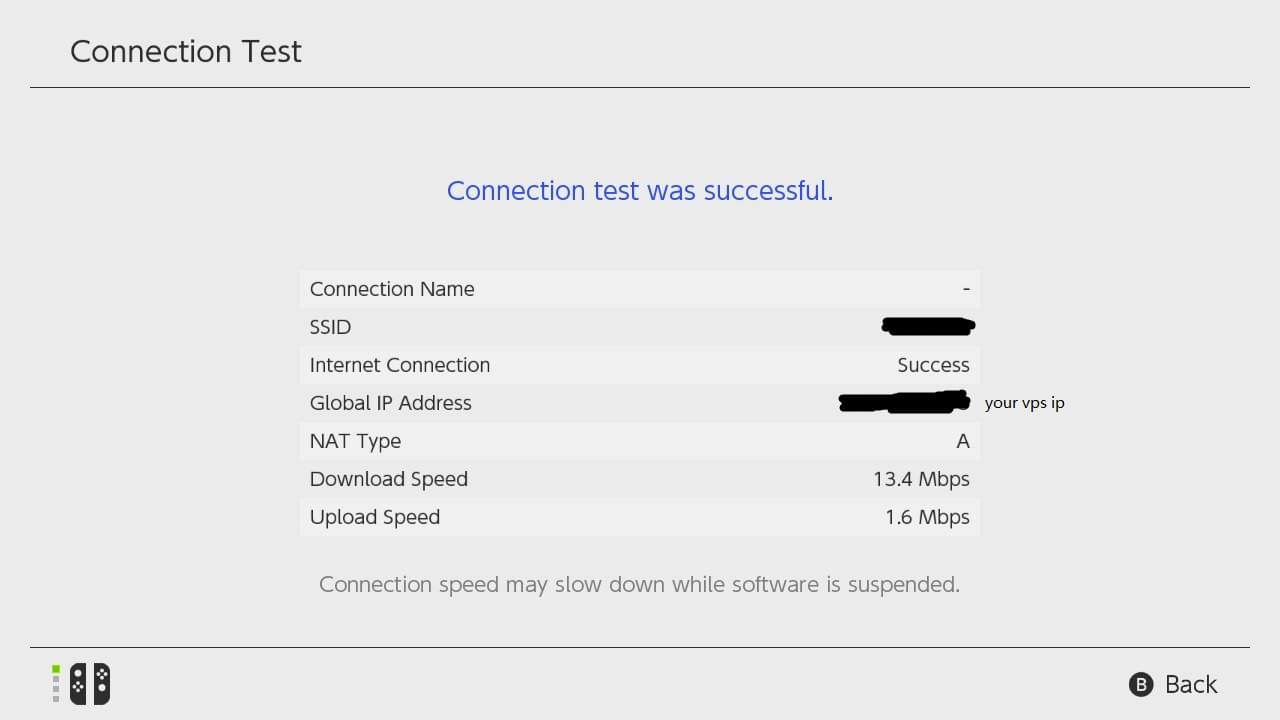
可见nat已变更为A